JioCloud PC - Word Game
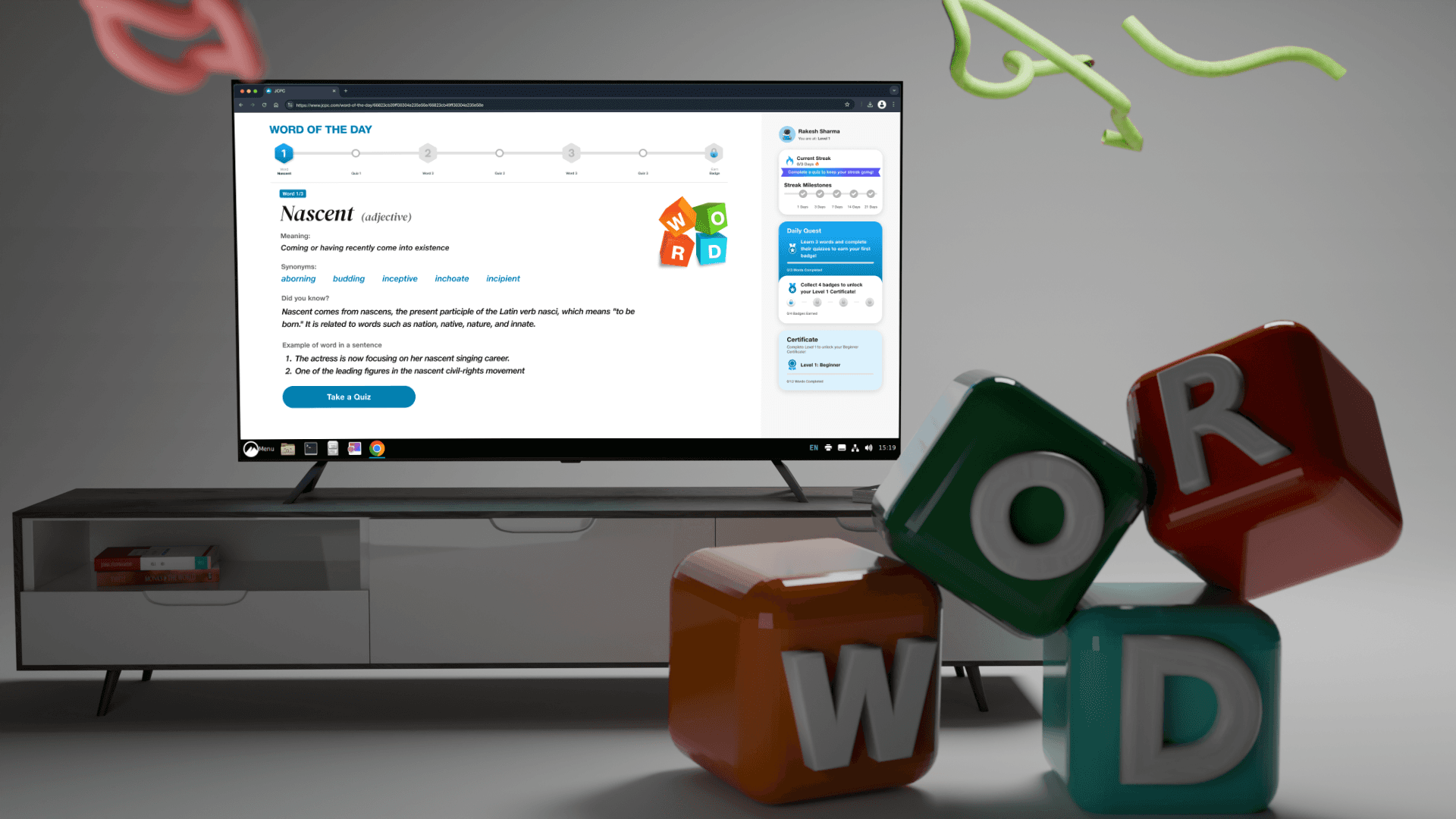
Created an interactive word discovery game for JioCloud PC that transforms vocabulary learning into an engaging journey for kids. Players challenge themselves with new words while exploring rich meanings, through gamified experiences.
Type
UX Design
Client
JioPC
Collaborators
1 PM, 1 PD, Devs
Project Duration
~1 Month
JioCloud PC - Word Game
Created an interactive word discovery game for JioCloud PC that transforms vocabulary learning into an engaging journey for kids. Players challenge themselves with new words while exploring rich meanings, through gamified experiences.
Type
UX Design
Client
JioPC
Collaborators
1 PM, 1 PD, Devs
Project Duration
~1 Month
JioCloud PC - Word Game
Created an interactive word discovery game for JioCloud PC that transforms vocabulary learning into an engaging journey for kids. Players challenge themselves with new words while exploring rich meanings, through gamified experiences.
Type
UX Design
Client
JioPC
Collaborators
1 PM, 1 PD, Devs
Project Duration
~1 Month
🧩 Project Brief
Project Brief
The JioCloud PC business team envisioned an mini casual interactive game targeted at kids aged 7+ to help them learn new English words in an engaging way.
The JioCloud PC business team envisioned an mini casual interactive game targeted at kids aged 7+ to help them learn new English words in an engaging way.
🚀 Outcomes
Outcomes
10k
10k
Users Engaged
Users
Engaged
7k
7k
Earned Certificates
Earned
Certificates
3k
3k
Completed all levels
Completed
all levels



📝 Context - JioPC
Context - JioPC
JioPC is a service that turns any television box into a cloud-powered PC through a Jio set top box. JioPC aims to provide affordable computing to Indian households with a low PC penetration in tier-2 and tier-3 cities. The service promises to offer functionalities like web browsing, word processing, e-learning sessions and the ability to run apps.
JioPC is a service that turns any television box into a cloud-powered PC through a Jio set top box. JioPC aims to provide affordable computing to Indian households with a low PC penetration in tier-2 and tier-3 cities. The service promises to offer functionalities like web browsing, word processing, e-learning sessions and the ability to run apps.
My Work
Contextual inquiry
Contextual inquiry
Workshops with
stakeholders
Workshops with
stakeholders
Research
Research
Design system & Interaction framework
Design system & Interaction framework
Design system & Interaction
framework
🧭 Design Goals
Design Goals
Make word learning fun and interactive for children aged 7+.
Support progress tracking with visual cues like streak badges, level badges and progress bars.
Keep UI TV-friendly with high readability and bold, interactive elements.
Encourage continued learning via positive reinforcement (motivating nudges, certificates, animated emojis).
Make word learning fun and interactive for children aged 7+.
Support progress tracking with visual cues like streak badges, level badges and progress bars.
Keep UI TV-friendly with high readability and bold, interactive elements.
Encourage continued learning via positive reinforcement (motivating nudges, certificates, animated emojis).
🧪 Early UI Pitches & Direction
Early UI Pitches & Direction
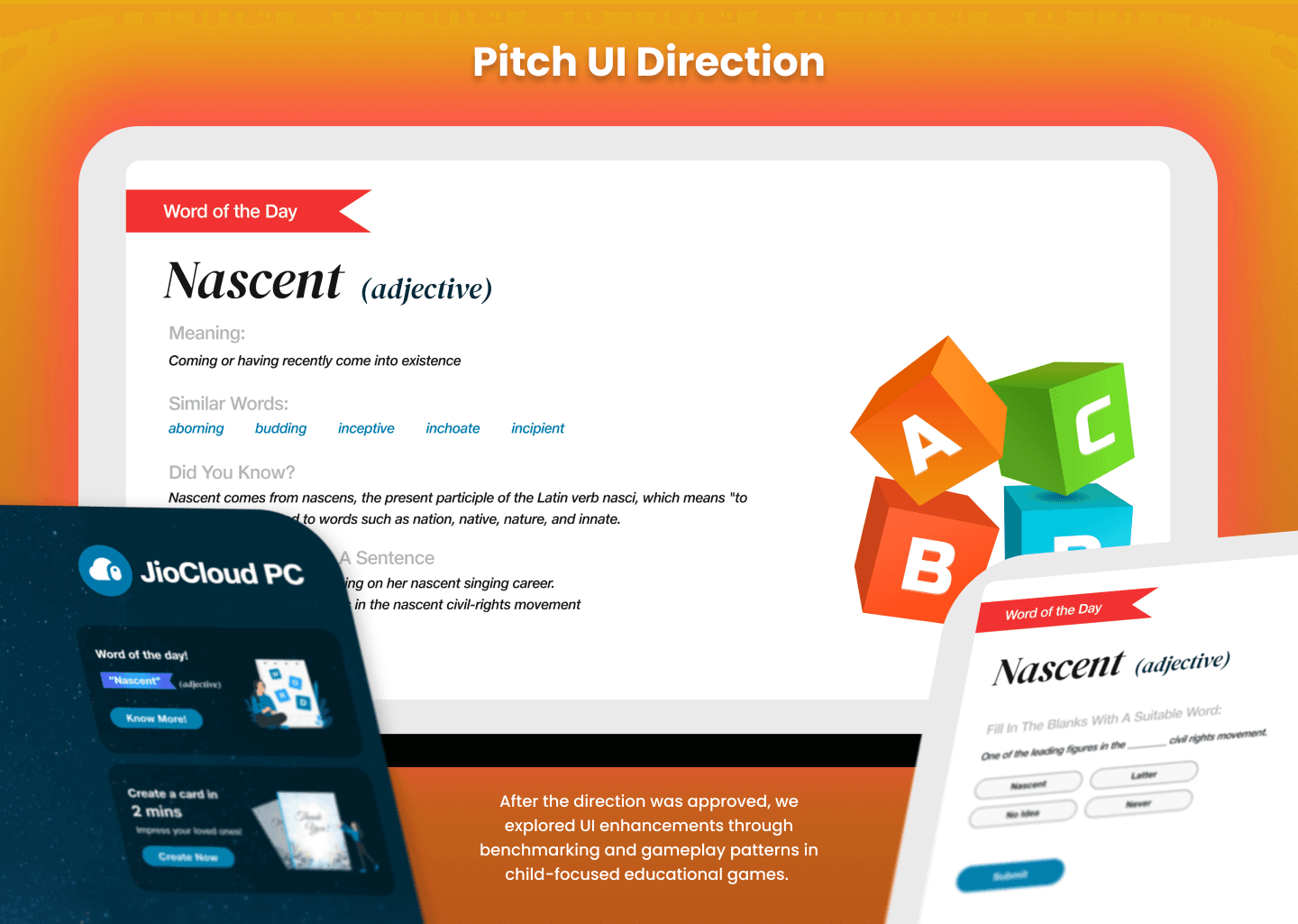
Our first UI pitch focused on:
• A minimal interface that contained information in modular blocks
• Clear CTAs
• Soft/cool color palette and large buttons suitable for TV display in align with JioPC brand guidelines
Our first UI pitch focused on:
• A minimal interface that contained information in modular blocks
• Clear CTAs
• Soft/cool color palette and large buttons suitable for TV display in align with JioPC brand guidelines
User
Research
User
Research
User
Research
🧠 Brainstorming & Guerrilla Testing
Brainstorming & Guerrilla Testing
Due to paucity in time to deliver, we established quick feedback loops to understand word game market and brainstorm ideas with product managers. We did secondary research to Jean Piaget’s child developmental modal specific from 7+ years of age(above Concrete Operational Stage).
After quick iterations we settled on UI being modular and also finalise logic to provide badges and the likes whilst coming up with ways to display them on screen.
Due to paucity in time to deliver, we established quick feedback loops to understand word game market and brainstorm ideas with product managers. We did secondary research to Jean Piaget’s child developmental modal specific from 7+ years of age(above Concrete Operational Stage).
After quick iterations we settled on UI being modular and also finalise logic to provide badges and the likes whilst coming up with ways to display them on screen.
🔍 Benchmarking & UI Enhancements
Benchmarking & UI Enhancements
We conducted secondary research and looked at platforms like:
Duolingo
Khan Academy
From this, we introduced:
Level progression info on the right panel for a detailed overview.
A progression bar at the top of the screen to show real-time progress within a level.
Chunking of questions to reduce overwhelm and keep motivation up. Also content-wise as difficulty levels goes up - more novel words would be introduced to keep the challenge up.
We conducted secondary research and looked at platforms like:
Duolingo
Khan Academy
From this, we introduced:
Level progression info on the right panel for a detailed overview.
A progression bar at the top of the screen to show real-time progress within a level.
Chunking of questions to reduce overwhelm and keep motivation up. Also content-wise as difficulty levels goes up - more novel words would be introduced to keep the challenge up.
🔄 Game Logic Structure
Game Logic Structure
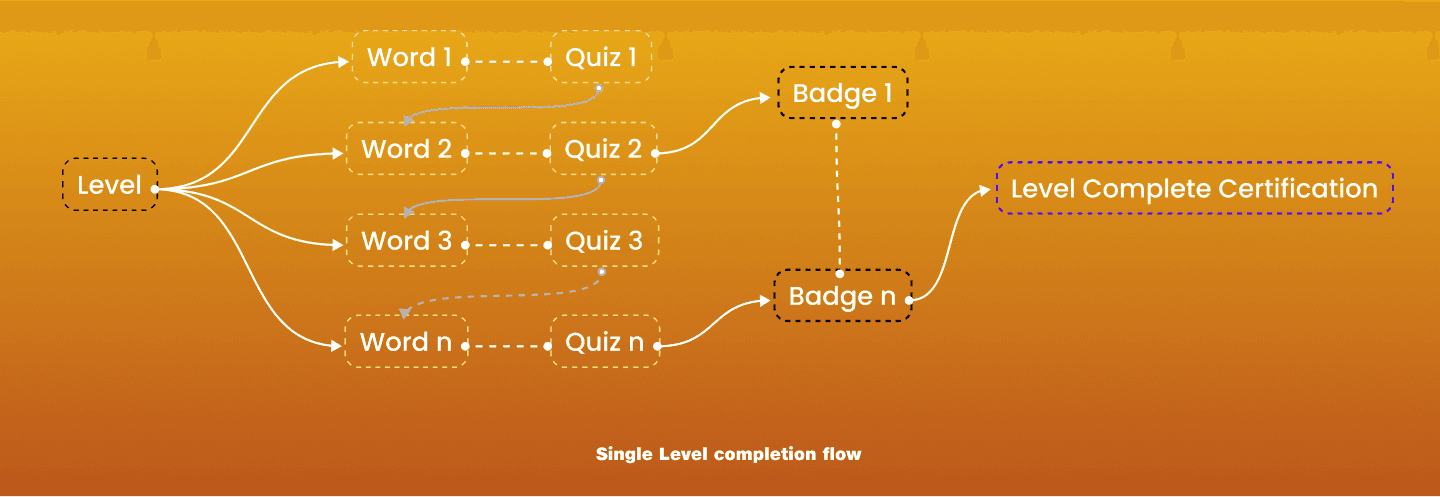
On collaboration with product managers, once the main game screen UI was finalised we needed to fix a logic structure on how badges will be earned and its frequency. On having the logic in place after finalisation could we fix the streak management and badge info panel on the right side of the screen as info HUD.
The Game logic structure is as follows-
The game is divided into multiple levels.
Each level contains a configurable number of questions.
Each level consisted of fixed number of words and questions into bite-sized chunks for better focus.
Players earn badges after completing each chunk, adding a sense of achievement.
On earning fixed number of badges the player will be awarded a certificate on successfully completing that level.
On collaboration with product managers, once the main game screen UI was finalised we needed to fix a logic structure on how badges will be earned and its frequency. On having the logic in place after finalisation could we fix the streak management and badge info panel on the right side of the screen as info HUD.
The Game logic structure is as follows-
The game is divided into multiple levels.
Each level contains a configurable number of questions.
Each level consisted of fixed number of words and questions into bite-sized chunks for better focus.
Players earn badges after completing each chunk, adding a sense of achievement.
On earning fixed number of badges the player will be awarded a certificate on successfully completing that level.
Designs
Designs
Designs
0
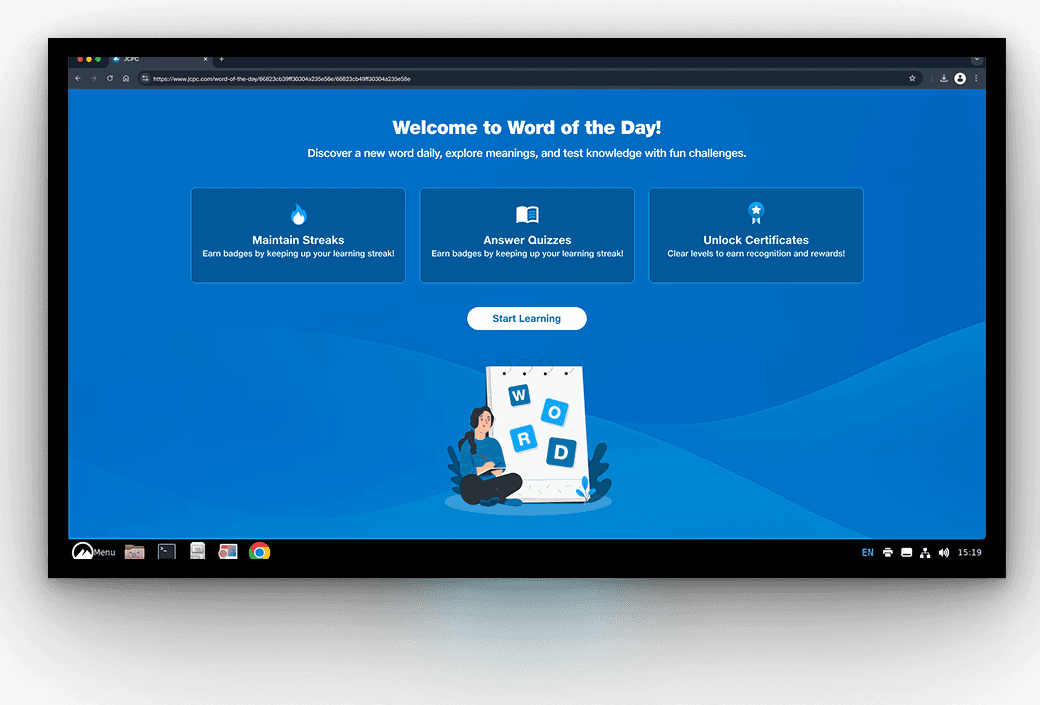
We start by onboarding kids with a quick walkthrough of the game’s basic mechanics—showing them how to navigate the screen, track their progress across levels, view badges, check streaks, and access their certificate.
A guided product tour highlights key areas of the interface, helping them feel confident and ready to explore on their own.
We start by onboarding kids with a quick walkthrough of the game’s basic mechanics—showing them how to navigate the screen, track their progress across levels, view badges, check streaks, and access their certificate.
A guided product tour highlights key areas of the interface, helping them feel confident and ready to explore on their own.
1
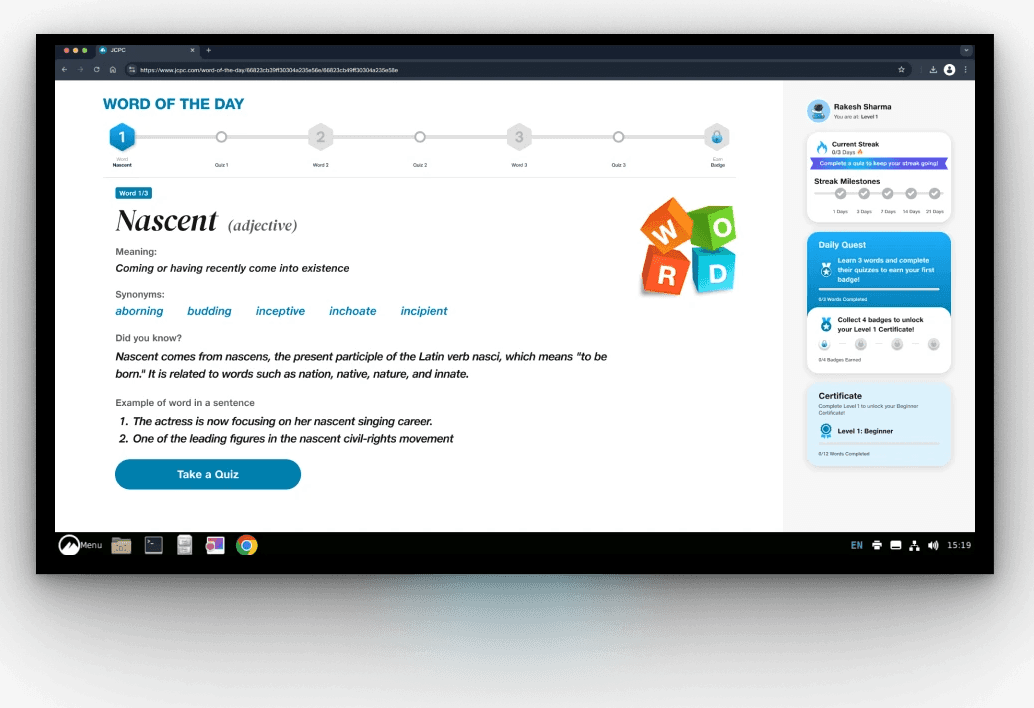
We arrive at the main game screen—where children are introduced to a new word and can also track their learning progress.
Drawing from Jean Piaget’s research, we know that children aged 7 and above can follow hierarchical logic. The challenge here was to determine how much visual information they can process without feeling overwhelmed. This screen is thoughtfully designed to scaffold their understanding and help them engage with different types of information about the word.
The screen serves three core purposes:
Introduce the new word – occupying the majority of the screen space.
Show progress status – via a progress bar and a contextual info panel on the right.
Encourage action – through a clear call-to-action to take the quiz and move forward.
We arrive at the main game screen—where children are introduced to a new word and can also track their learning progress.
Drawing from Jean Piaget’s research, we know that children aged 7 and above can follow hierarchical logic. The challenge here was to determine how much visual information they can process without feeling overwhelmed. This screen is thoughtfully designed to scaffold their understanding and help them engage with different types of information about the word.
The screen serves three core purposes:
Introduce the new word – occupying the majority of the screen space.
Show progress status – via a progress bar and a contextual info panel on the right.
Encourage action – through a clear call-to-action to take the quiz and move forward.
2
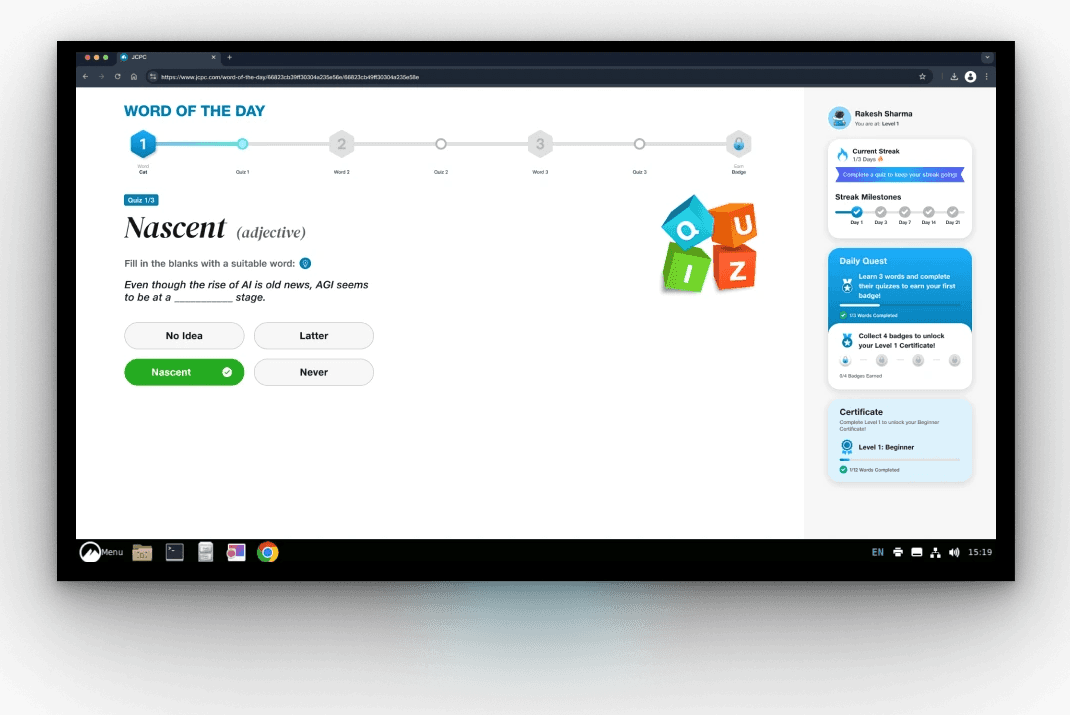
Following our brainstorming, we decided to introduce a challenge immediately after presenting the word—using a variety of question types to test understanding and keep the experience engaging.
By completing these word sprints, kids not only reinforce their learning but also earn badges and gradually level up their word mastery—making progress feel rewarding and motivating.
Following our brainstorming, we decided to introduce a challenge immediately after presenting the word—using a variety of question types to test understanding and keep the experience engaging.
By completing these word sprints, kids not only reinforce their learning but also earn badges and gradually level up their word mastery—making progress feel rewarding and motivating.
3
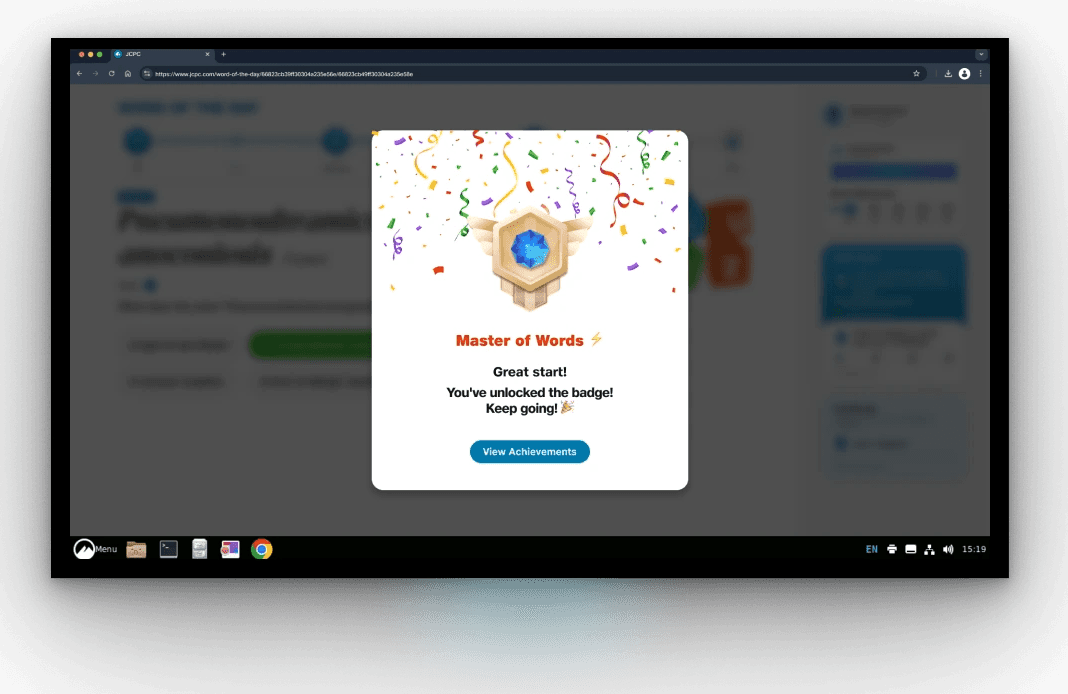
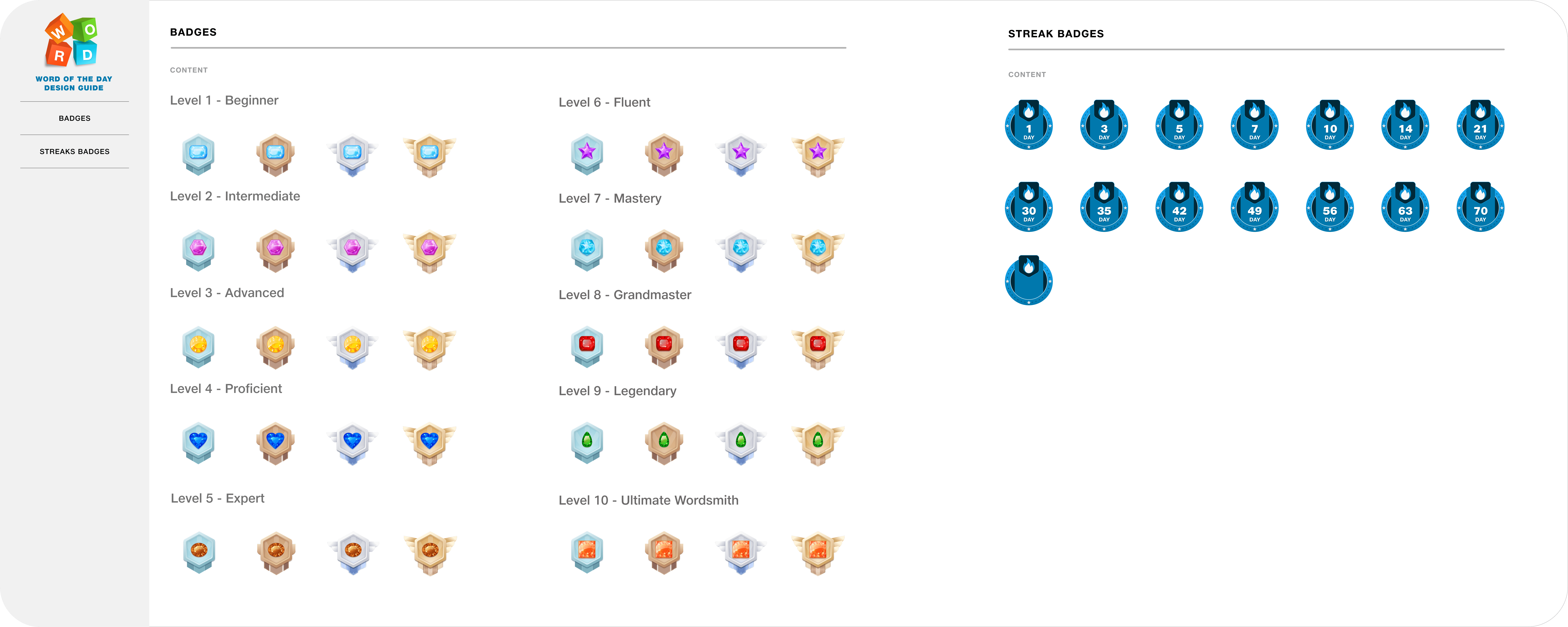
Kids earn gems or badges after completing each word sprint, which is broken down into fun, manageable chunks. As they progress, they also unlock titles like “Master of Words,” reinforcing positive associations with learning and giving them a sense of achievement. These gentle nudges help keep motivation high and momentum steady.
Micro-animations, such as bursts of confetti, add delightful moments of celebration—transforming each small milestone into a joyful experience.
Kids earn gems or badges after completing each word sprint, which is broken down into fun, manageable chunks. As they progress, they also unlock titles like “Master of Words,” reinforcing positive associations with learning and giving them a sense of achievement. These gentle nudges help keep motivation high and momentum steady.
Micro-animations, such as bursts of confetti, add delightful moments of celebration—transforming each small milestone into a joyful experience.
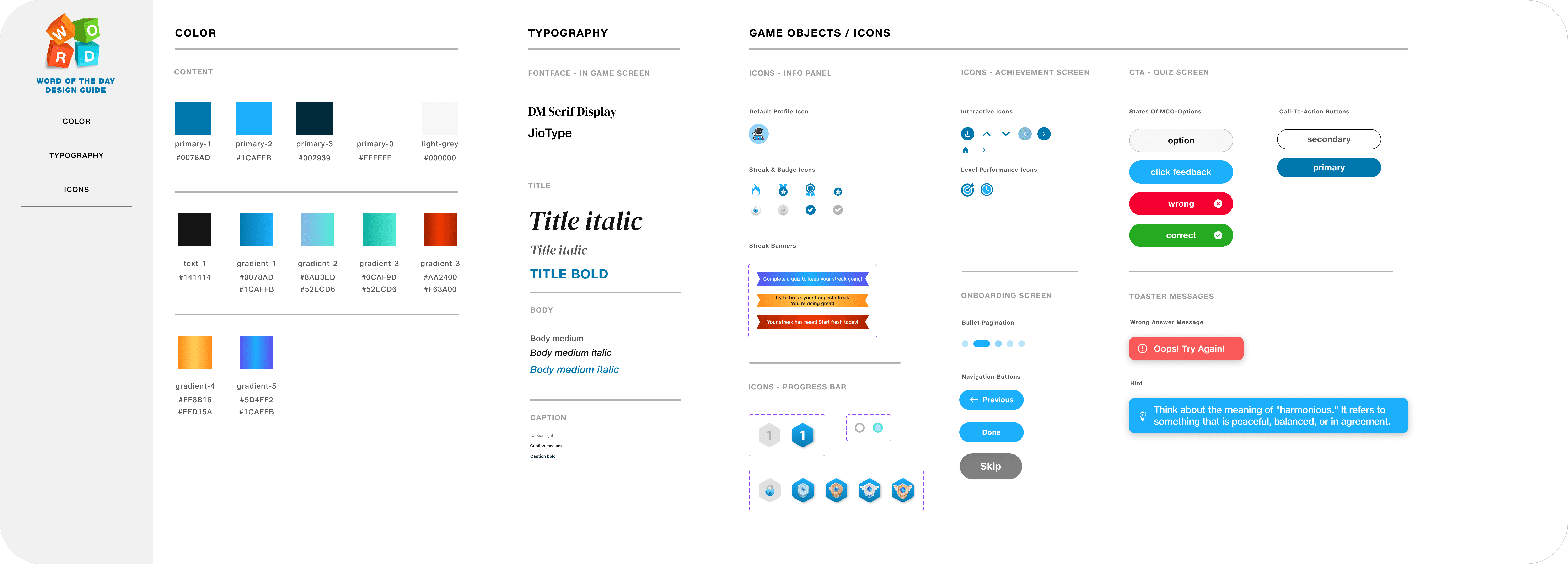
Design
System
Design
System
Design
System
Outcomes
Outcomes
Outcomes
The users engaged with this were coming from tier-1 and ier-2 cities and mainly reflected the desire to learn new words and add them to their vocabulary.
The users engaged with this were coming from tier-1 and ier-2 cities and mainly reflected the desire to learn new words and add them to their vocabulary.
10k
Users Engaged
7k
Earned Certificates
3k
Completed
all levels
10k
Users Engaged
7k
Earned Certificates
3k
Completed all levels