Revamped Fruity Granuliser UI - FL Studio’s native VST
Redesigned granuliser UI and created conceptual skin selection menu UI for multiple skins using Rive.
Type
UI / UX Design
Client
ImageLine
Project Duration
~1 Month
Revamped Fruity Granuliser UI
Redesigned granuliser UI and created conceptual skin selection menu UI for multiple skins using Rive.
Type
UI / UX Design
Client
ImageLine
Project Duration
~1 Month
Revamped Fruity Granuliser UI - FL Studio’s native VST
Redesigned granuliser UI and created conceptual skin selection menu UI for multiple skins using Rive.
Type
UI / UX Design
Client
ImageLine
Project Duration
~1 Month
Design Brief
Redesign the Fruity Granuliser VST in FL Studio to give it a sleek, modern visual update while retaining the original charm and familiarity that long-time users appreciate. Enhance visual clarity and usability, making it more intuitive for users to shape and manipulate sound, without compromising the plugin’s iconic character.
Also create product showreel derived from Adobe’s generative engine AdobeFirefly.
Redesign the Fruity Granuliser VST in FL Studio to give it a sleek, modern visual update while retaining the original charm and familiarity that long-time users appreciate. Enhance visual clarity and usability, making it more intuitive for users to shape and manipulate sound, without compromising the plugin’s iconic character.
Also create product showreel derived from Adobe’s generative engine AdobeFirefly.
Context
Fruity Granuliser is VST plugin that helps in granular synthesising of any sounds or samples by splitting down the audio signal to smaller grains and looping back and playing it. Its signature sound has found its home in many electronic genres, and recently popularised by left-field artists like Flume, Grimes.
I wanted to flex my creative muscles by redesigning a system that could help both new and seasoned users channel their creativity with clearer visual feedback—easing some of the cognitive uncertainty that often comes with complex sound manipulation. The goal was to bring a sense of clarity and structure to workflows that can otherwise feel abstract or opaque.
Honestly, it baffled me how underrated this VST is and simply hidden in plain sight. That led me to take on the challenge of giving this low-key beast the visual upgrade it deserves.
Lack of visual feedback, especially when granulating audio samples, can leave users in a fog of uncertainty—even when they’re on the brink of discovering something they love. While some purists may prefer the spontaneity of working blind, I believe there's value in offering just enough visual cues to guide exploration without limiting it.
Fruity Granuliser is VST plugin that helps in granular synthesising of any sounds or samples by splitting down the audio signal to smaller grains and looping back and playing it. Its signature sound has found its home in many electronic genres, and recently popularised by left-field artists like Flume, Grimes.
I wanted to flex my creative muscles by redesigning a system that could help both new and seasoned users channel their creativity with clearer visual feedback—easing some of the cognitive uncertainty that often comes with complex sound manipulation. The goal was to bring a sense of clarity and structure to workflows that can otherwise feel abstract or opaque.
Honestly, it baffled me how underrated this VST is and simply hidden in plain sight. That led me to take on the challenge of giving this low-key beast the visual upgrade it deserves.
Lack of visual feedback, especially when granulating audio samples, can leave users in a fog of uncertainty—even when they’re on the brink of discovering something they love. While some purists may prefer the spontaneity of working blind, I believe there's value in offering just enough visual cues to guide exploration without limiting it.
Inspiration
My recent experiments with VCV Rack gave me a deeper appreciation for how design can be extrapolated from hardware to software-based synths. It sparked the idea that bringing in vintage skeuomorphic elements—like sliders, knobs, and switches—can enhance the tactile feel of a plugin, even in a digital space. These familiar affordances give users a sense of control, while modern UI practices allow for layered visual feedback that supports experimentation.
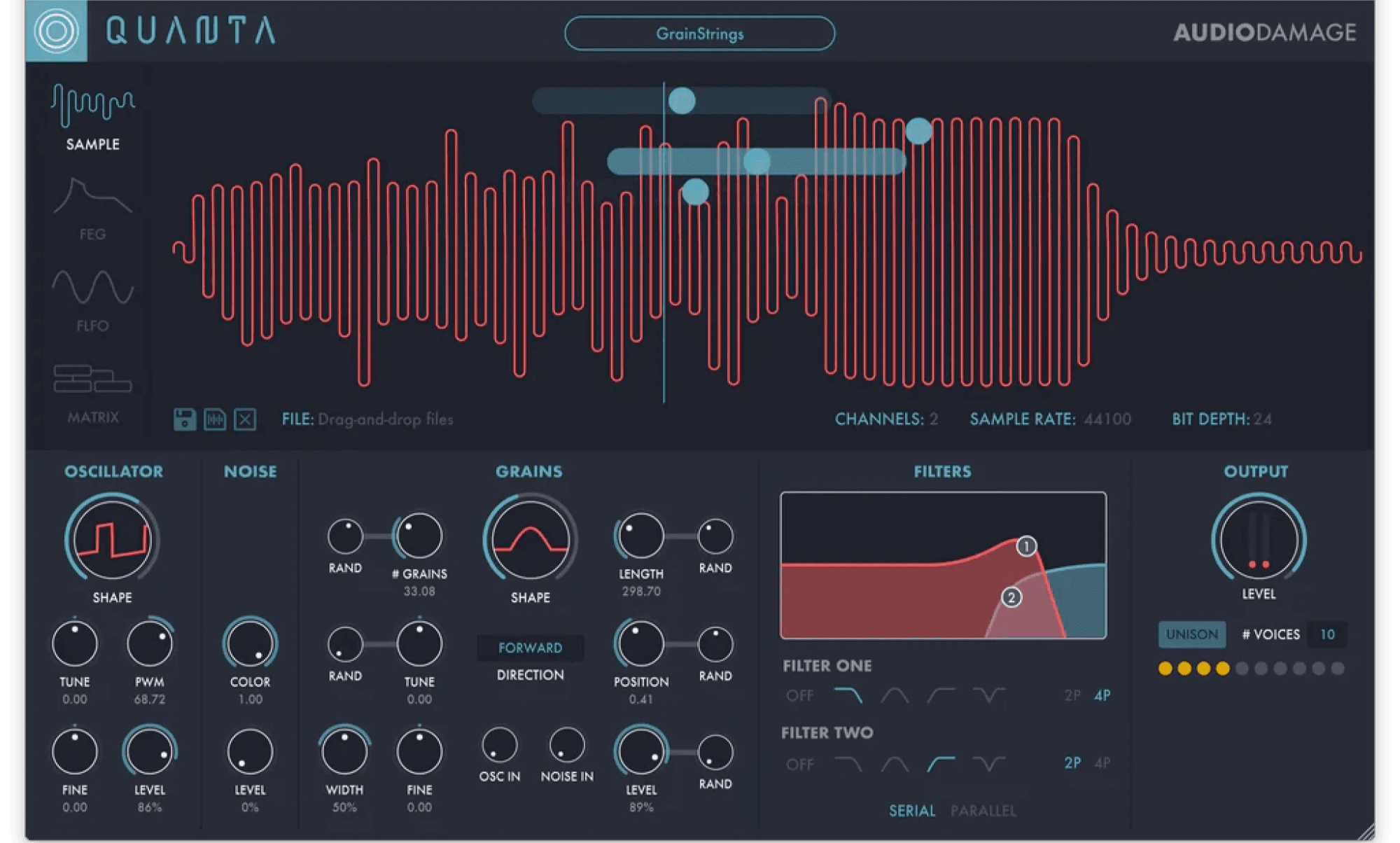
I aimed to strike a balance: keeping the nostalgic analog charm while leveraging the flexibility of digital interfaces. My inspirations ranged from Quanta to Mutable Instruments’ Clouds—both offering rich, exploratory sound design environments that feel intuitive and expressive.
My recent experiments with VCV Rack gave me a deeper appreciation for how design can be extrapolated from hardware to software-based synths. It sparked the idea that bringing in vintage skeuomorphic elements—like sliders, knobs, and switches—can enhance the tactile feel of a plugin, even in a digital space. These familiar affordances give users a sense of control, while modern UI practices allow for layered visual feedback that supports experimentation.
I aimed to strike a balance: keeping the nostalgic analog charm while leveraging the flexibility of digital interfaces. My inspirations ranged from Quanta to Mutable Instruments’ Clouds—both offering rich, exploratory sound design environments that feel intuitive and expressive.
Quanta
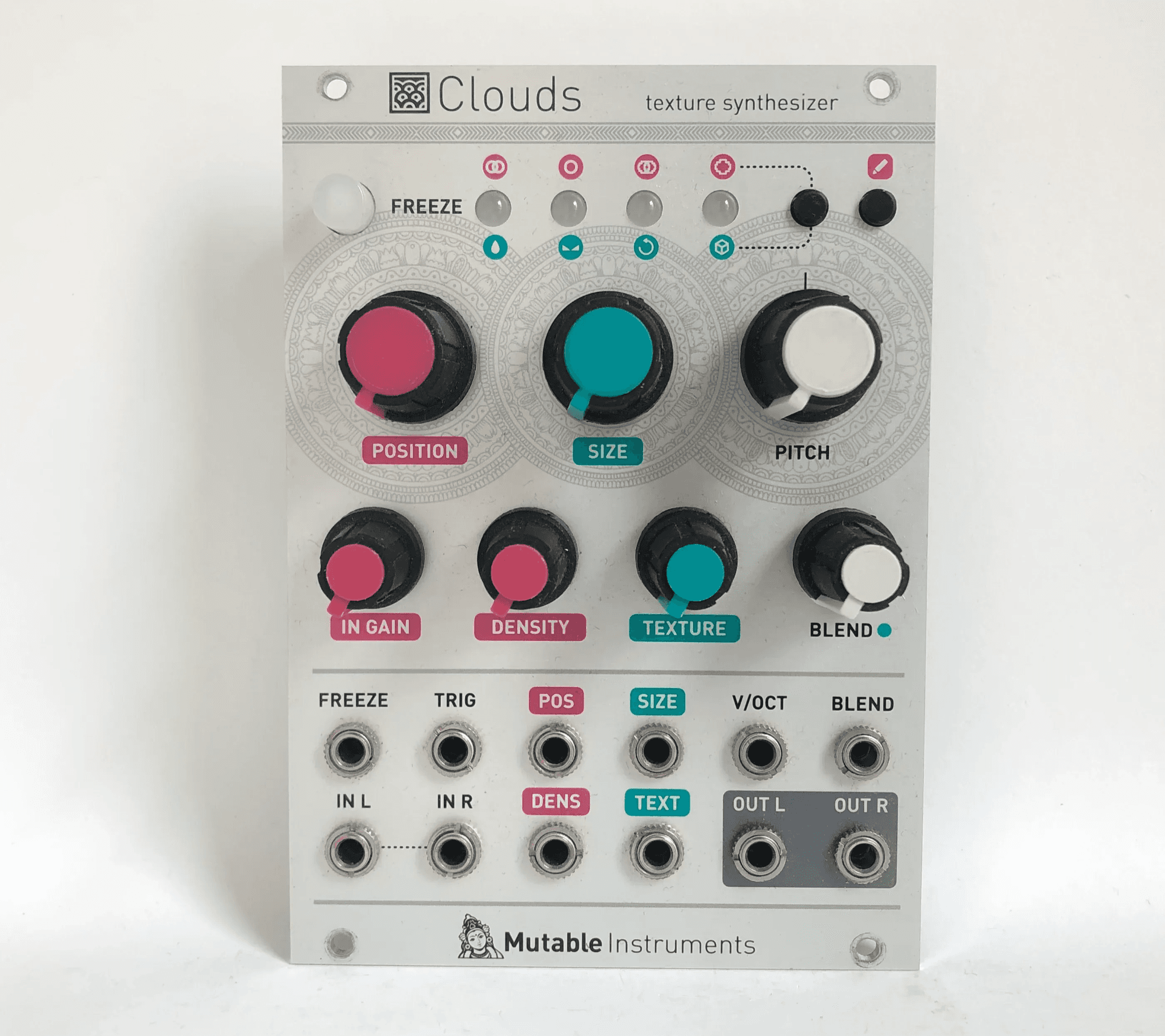
Clouds
Also giving a peek into Dribble and Behance, especially designs from Mik Skuza gave me a direction in translating my design philosophy into the tangible form it looked for.
Also giving a peek into Dribble and Behance, especially designs from Mik Skuza gave me a direction in translating my design philosophy into the tangible form it looked for.
My Process
My
Process
My Process
Getting juices flowing
I began with a few quick hand-drawn sketches—just to get ideas out fast. From the start, I knew I wanted to retain the core modular elements of the original plugin. It didn’t make sense to completely reinvent its structure, but there was plenty of room to explore: the placement of modules, toggle switches, and especially the textures and visual language of the interface.
I began with a few quick hand-drawn sketches—just to get ideas out fast. From the start, I knew I wanted to retain the core modular elements of the original plugin. It didn’t make sense to completely reinvent its structure, but there was plenty of room to explore: the placement of modules, toggle switches, and especially the textures and visual language of the interface.
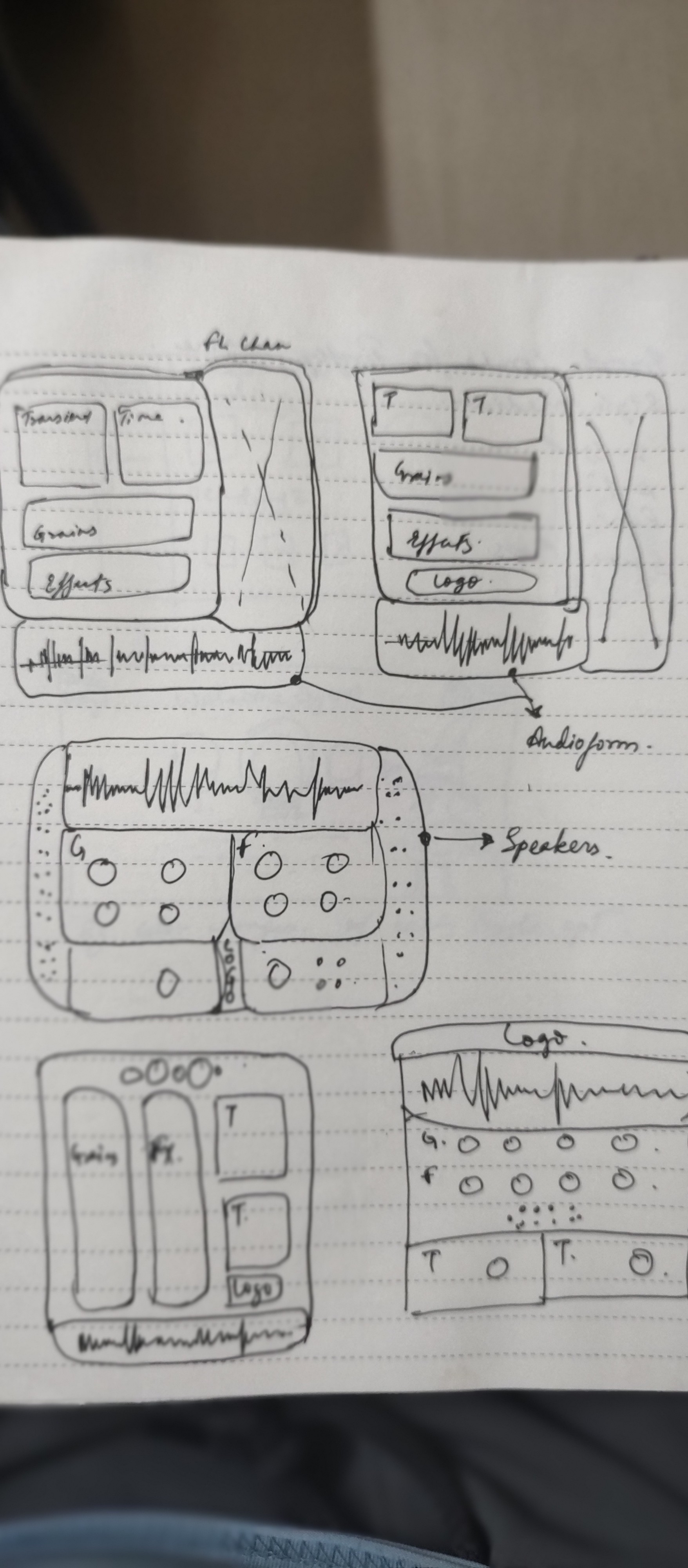
My goal was to merge a vintage aesthetic with a clean, modern minimalism—something that feels tactile and analog, yet is digitally intuitive. I was drawn to the idea of perforated speaker grills as a design motif. Compared to slick metallic or synthetic surfaces, grills felt like the perfect metaphor for a tool that’s all about chopping and scattering sound.
Functionally, I introduced a scrub bar—a visual element that activates when MIDI input is received or when a note is played. Since granulising in FL Studio involves using audio samples, this bar highlights which region of the waveform is currently being broken into grains. These visual cues give users a more intuitive, metaphorical mapping of their sound, helping them better understand and refine their creative process.
My goal was to merge a vintage aesthetic with a clean, modern minimalism—something that feels tactile and analog, yet is digitally intuitive. I was drawn to the idea of perforated speaker grills as a design motif. Compared to slick metallic or synthetic surfaces, grills felt like the perfect metaphor for a tool that’s all about chopping and scattering sound.
Functionally, I introduced a scrub bar—a visual element that activates when MIDI input is received or when a note is played. Since granulising in FL Studio involves using audio samples, this bar highlights which region of the waveform is currently being broken into grains. These visual cues give users a more intuitive, metaphorical mapping of their sound, helping them better understand and refine their creative process.
I used Figma to create the initial prototype, and then turned to Adobe Firefly and Udio to generate visuals and audio assets for a more immersive product reel—from concept posters to video snippets.
Once the prototype was in place, I leveraged Firefly’s generative tools to design banners and build out a showreel. After a few prompt iterations and generating some B-rolls, I brought everything together in Premiere Pro. It took a few rounds, but I was finally happy with the final cut.
I used Figma to create the initial prototype, and then turned to Adobe Firefly and Udio to generate visuals and audio assets for a more immersive product reel—from concept posters to video snippets.
Once the prototype was in place, I leveraged Firefly’s generative tools to design banners and build out a showreel. After a few prompt iterations and generating some B-rolls, I brought everything together in Premiere Pro. It took a few rounds, but I was finally happy with the final cut.
Designs
Designs
Designs
OG v/s Prototype
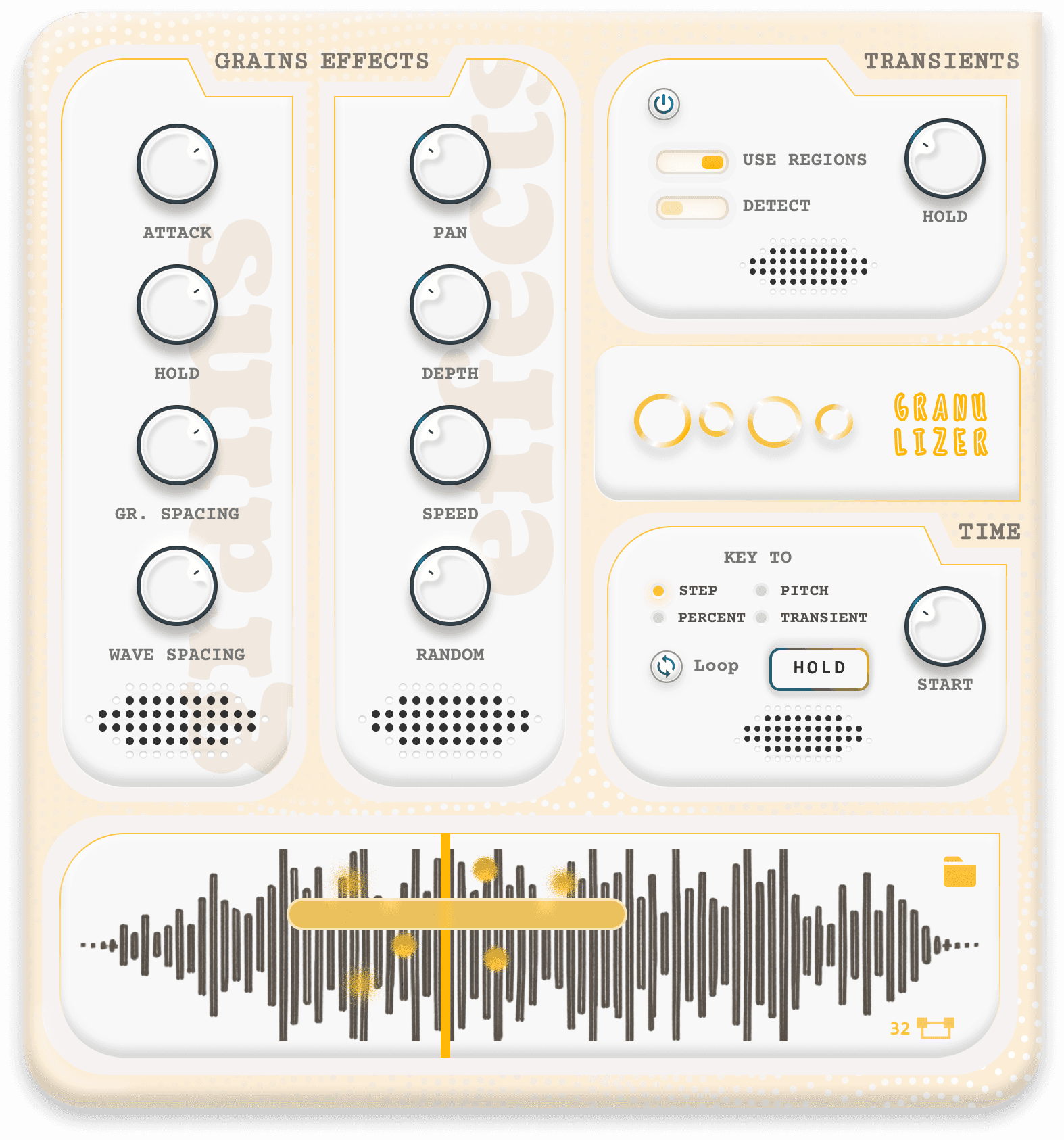
Comparing the original and redesigned versions, the most noticeable shift is in the color palette—the original leaned heavily into a charcoal grey scheme, while the new design takes a bold, contrasting direction.
Several interface elements were reimagined: the original radio buttons within the "Transient" and "Time" modules were replaced with sliders, and in some cases, unlabeled button affordances were used—such as for the “Power Off” function—to keep the interface clean and intuitive. The dropdown menu inside the Time module was transformed into a set of clearly listed radio options for better accessibility.
One of the more significant upgrades is in the audio sample unit. Unlike the original, the redesigned version introduces a scrub bar with animated grain visuals that move and scatter based on real-time changes in settings—giving users immediate, tactile feedback as they shape their sound.
Comparing the original and redesigned versions, the most noticeable shift is in the color palette—the original leaned heavily into a charcoal grey scheme, while the new design takes a bold, contrasting direction.
Several interface elements were reimagined: the original radio buttons within the "Transient" and "Time" modules were replaced with sliders, and in some cases, unlabeled button affordances were used—such as for the “Power Off” function—to keep the interface clean and intuitive. The dropdown menu inside the Time module was transformed into a set of clearly listed radio options for better accessibility.
One of the more significant upgrades is in the audio sample unit. Unlike the original, the redesigned version introduces a scrub bar with animated grain visuals that move and scatter based on real-time changes in settings—giving users immediate, tactile feedback as they shape their sound.
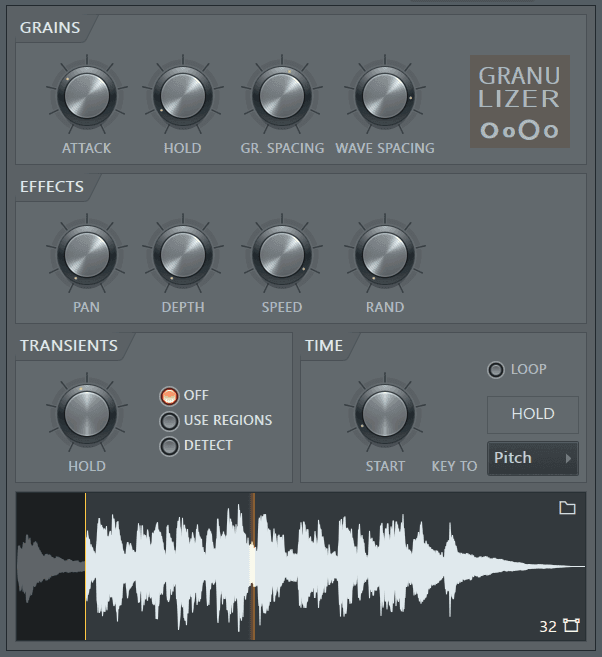
Original UI
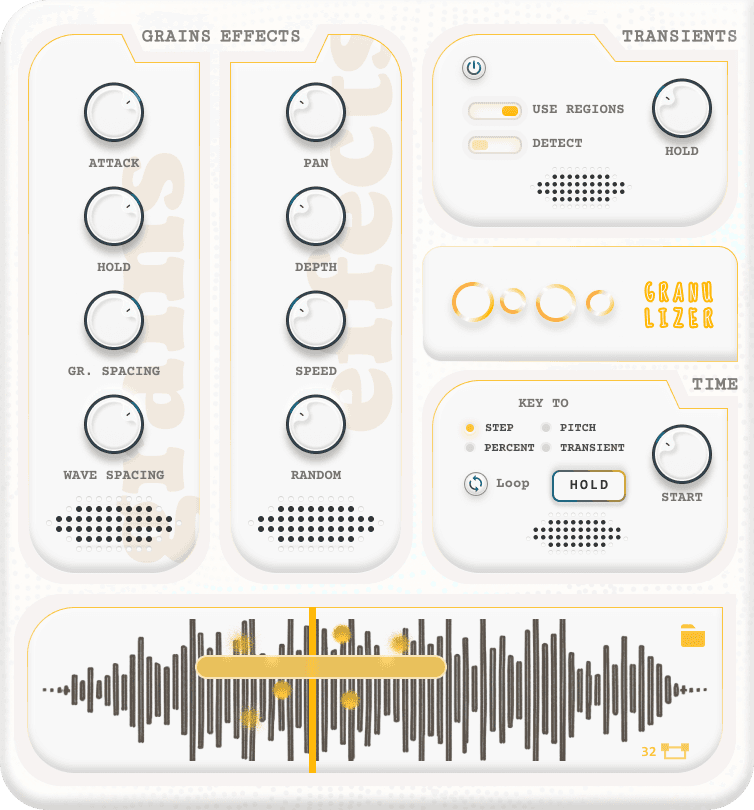
Revamped UI
Light-skin Version
Using Adobe
Firefly
Using Adobe
Firefly
Using Adobe
Firefly
Posters
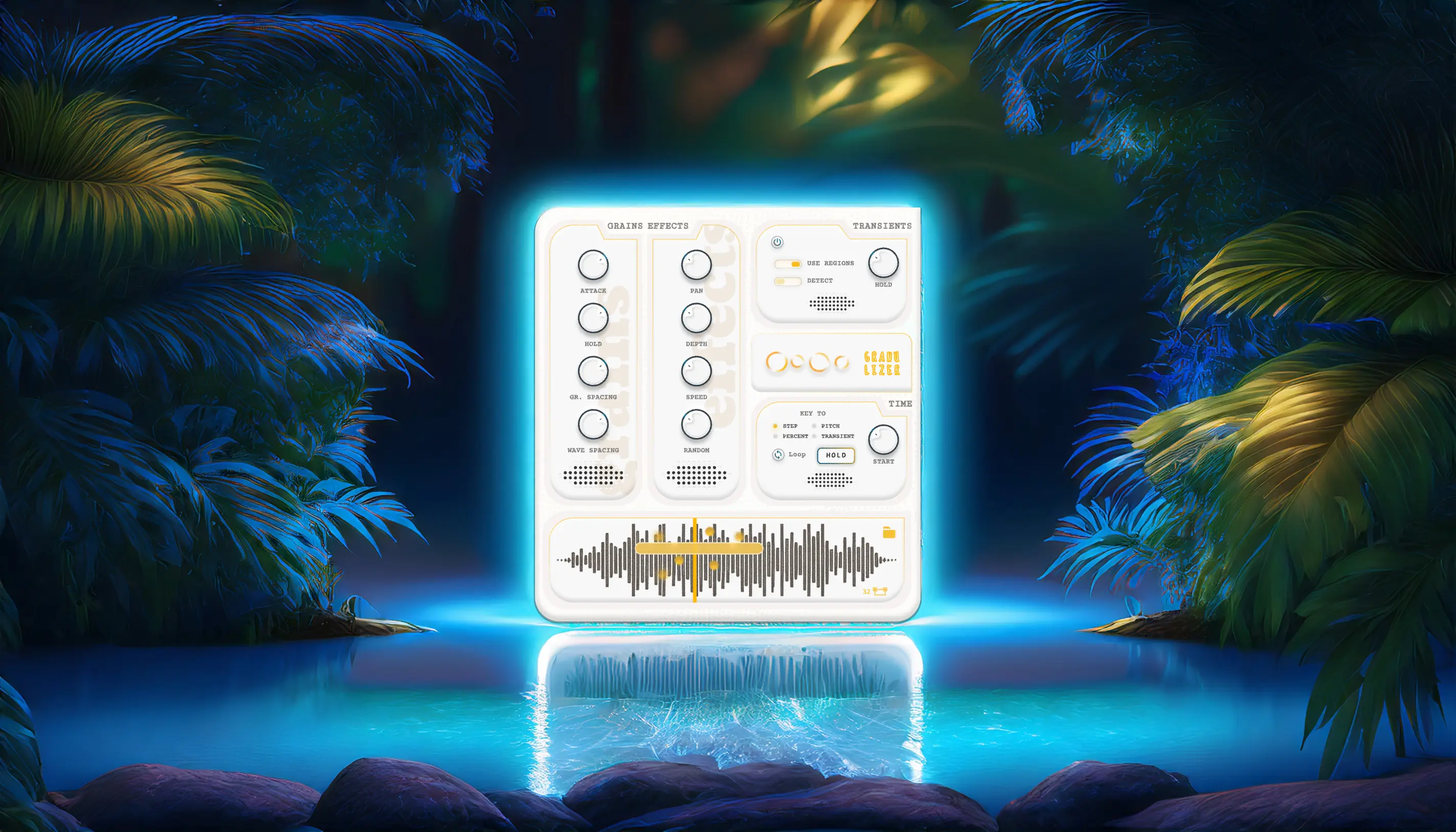
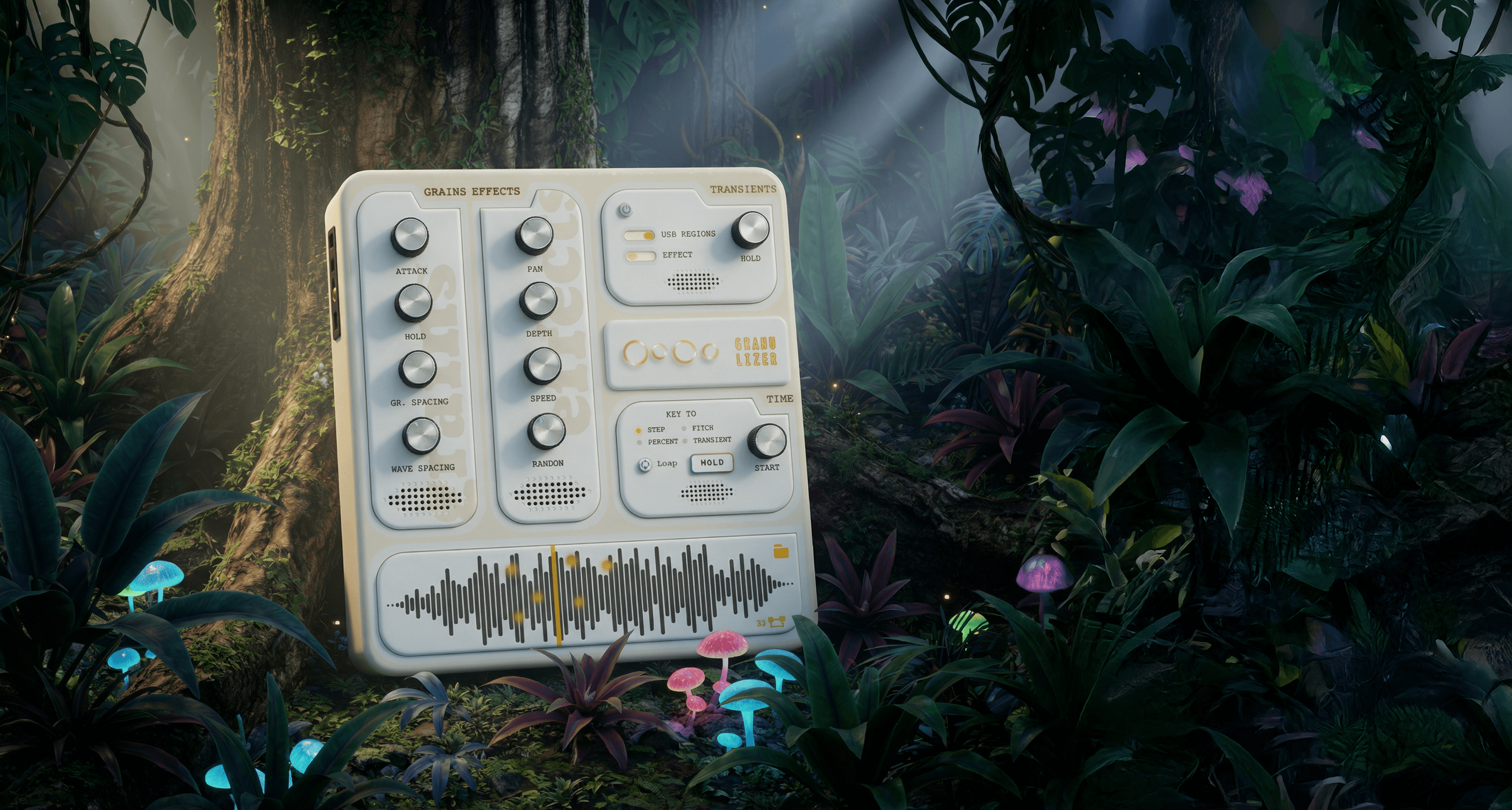
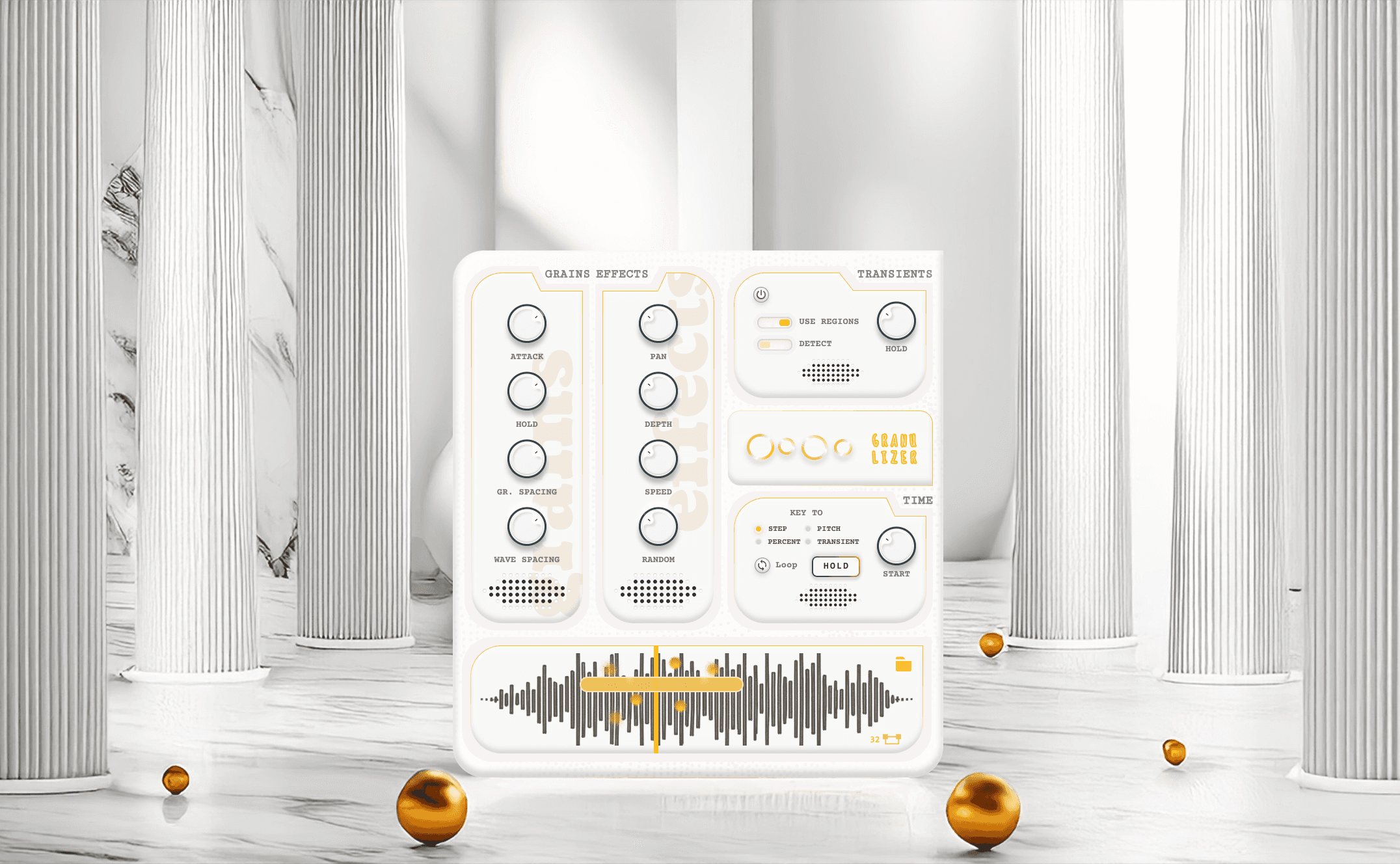
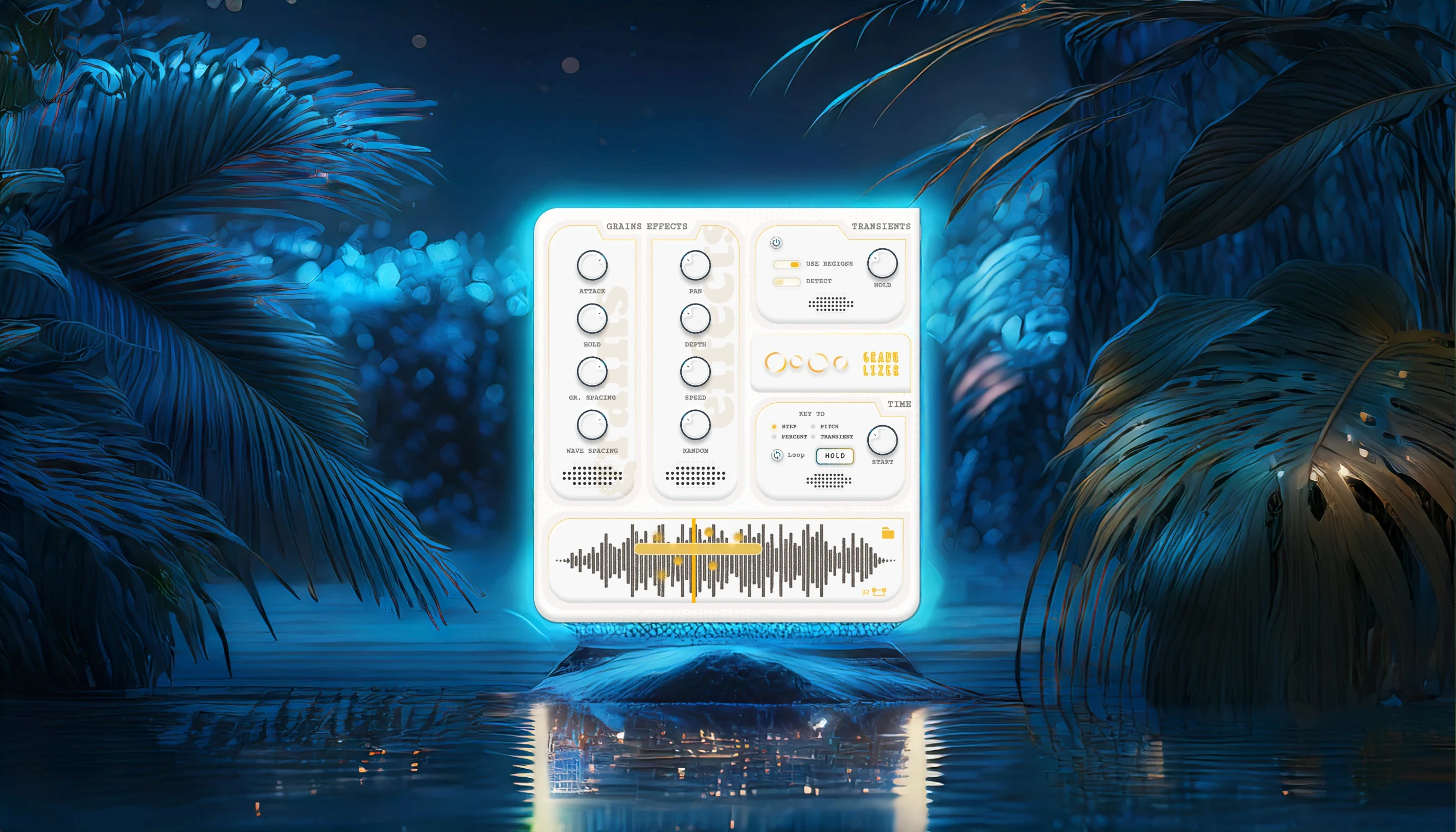
I wanted to blend sleek modern aesthetics with natural elements to create a premium, yet lush and surreal earthy feel. I enjoy working with such juxtapositions—experimenting with contrasting themes where the subject attempts to tie everything together. For this project, I used Photoshop’s extensive generative fill capabilities to incorporate elements like water, sand, vegetation, Greek architecture, marble material, and abstract textures.
I wanted to blend sleek modern aesthetics with natural elements to create a premium, yet lush and surreal earthy feel. I enjoy working with such juxtapositions—experimenting with contrasting themes where the subject attempts to tie everything together. For this project, I used Photoshop’s extensive generative fill capabilities to incorporate elements like water, sand, vegetation, Greek architecture, marble material, and abstract textures.
Product Showreel
On finalising on posters i wanted to explore Firefly's video geenration capabilities. It uses first and last frame for a video thats to be generated. It generates about 5 seconds video based on first and last frame selected. Generated with Firefly, it is quite polished despite having some artefacts embedded in it. I thought it was pretty cool. Hope you enjoyed it!
On finalising on posters i wanted to explore Firefly's video geenration capabilities. It uses first and last frame for a video thats to be generated. It generates about 5 seconds video based on first and last frame selected. Generated with Firefly, it is quite polished despite having some artefacts embedded in it. I thought it was pretty cool. Hope you enjoyed it!
Using Rive for dynamic menu
Using Rive for dynamic menu
Using Rive for dynamic menu
Working in Rive
Even though I thought I had wrapped this exploration up last year, as I document this at the start of 2026, the idea resurfaced organically. This time, it became an opportunity to experiment with Rive—specifically to prototype a conceptual, dynamic skin-selection menu.
After finalizing the initial visual designs, I focused on leveraging Rive’s data-binding capabilities to bring the menu to life. The goal was to ensure that every animation state remained truly dynamic, allowing the interface to respond fluidly rather than relying on pre-baked transitions.
Even though I thought I had wrapped this exploration up last year, as I document this at the start of 2026, the idea resurfaced organically. This time, it became an opportunity to experiment with Rive—specifically to prototype a conceptual, dynamic skin-selection menu.
After finalizing the initial visual designs, I focused on leveraging Rive’s data-binding capabilities to bring the menu to life. The goal was to ensure that every animation state remained truly dynamic, allowing the interface to respond fluidly rather than relying on pre-baked transitions.
Objective: To test out the new features of data binding in Rive.
From the original designs i created multiple 3d renders comprising multi-themed skins. Using Figma's image creation capabilities, i generated high quality skins for the VST.
Objective: To test out the new features of data binding in Rive.
From the original designs i created multiple 3d renders comprising multi-themed skins. Using Figma's image creation capabilities, i generated high quality skins for the VST.
Building on the theme of nature-inspired contemporary abstraction, I explored a chibi-fied approach to representing different skins—treating each as a distinct personality rather than a purely visual variant. To bring this idea to life, we introduced avatar-based representations for each skin. The resulting chibi-style characters are designed to feel colourful, approachable and playful, while still reinforcing the product’s core values of reliability and functional clarity.
Building on the theme of nature-inspired contemporary abstraction, I explored a chibi-fied approach to representing different skins—treating each as a distinct personality rather than a purely visual variant. To bring this idea to life, we introduced avatar-based representations for each skin. The resulting chibi-style characters are designed to feel colourful, approachable and playful, while still reinforcing the product’s core values of reliability and functional clarity.